Quick Start Guide 💻
1. Get your PowerPixel and Install it on Your Website
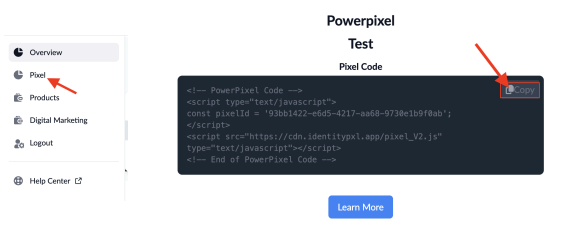
Paste PowerPixel code inside the < head /> section of your website OR inside Google Tag Manager inside ALL pages. For detailed instructions click ‘Learn More’ under the PowerPixel text box.

2. Update your Privacy Policy
For customers and clients who purchase data from Pixonomi: Copy any relevant sections below in the Privacy Policy template, and paste it into your website’s privacy policy to ensure compliance
Privacy Policy Template:
Privacy Policy Template
Third-Party Pixels and Cookies:
When you interact with our website—whether you're logging in, registering, or opening an email—various technologies like cookies, ad beacons, and similar tools might be used by our online partners or vendors. These technologies can link your actions with the information they or others have about you, including your email address. Afterward, we (or the services we use) may use this info to send you communications and marketing materials to the email addresses associated with your activities. If you'd rather not receive these ads, you can opt out by visiting our website at websitename.com/opt-out.
Compliant Data Collection:
All data provided by our data providers arey 100% compliant, first party data, that is completely owned by our data providers. We do not, and will never participate in data scraping or unethical forms of data extraction.
The Data Collection Process of our Provider:
Our data providers use third party cookies, IP Addresses and Digital Fingerprints to identify a MD5 (anonymous device ID). The ID is then match the MD5 to uncover the hashed email or “sha256” which allows us to unlock the PII (Personal Identifiable Information). Summary: the data is already owned by our company and our providers, and the identities we resolve are first party data based on our actual website visitors.
California "Do Not Sell My Info" Opt-Out:
For California consumers, as outlined by the California Consumer Privacy Act (CCPA), you have the option to opt out of the future "sale" of your Personal Information, according to the CCPA's definition of "sale." To exercise this right, simply send an email to privacy@yourwebsite.com, providing the necessary details for us to process your opt-out request. Include your name, email address, and postal address. In some cases, we might ask for extra information to confirm your identity.
3. Watch your PowerPixel leads come into your Client Dashboard
In the “Overview” section of your dashboard, you will see your leads generated by the PowerPixel. Newly Identified Visitors are counted as a lead. View the Name, Email, Phone, Age, Gender, Income, Company Name, Business Email, LinkedIn URL, and much more! Export to CSV any time for additional details.
Dashboard Features to know about:
Credits Remaining:
- This is the number of credits (Identified Visitors) remaining in your billing cycle.
- 1 Identified Visitor = 1 Credit
- 1 Credit = 24 hours unlimited real-time page visit data per Identified Visitor
Total Leads:
- Newly Identified Visitors are counted as a lead.
- View the number of leads obtained through the PowerPixel. The first step to tracking your success.
Extra Usage:
- The extra usage balance is designed as a protection if you go over your credit limit. Don't miss out on leads when your website volume spikes.
- For every additional credit above your limit, the balance will increase by $0.XX depending on your selected plan
- When the extra usage balance reaches $100, the balance will be charged and reset to $0.
- If $100 is not reached within the billing cycle, the balance will be charged at your next monthly billing cycle.
- Balance will be charged when the $100 extra usage balance is met.
For Annual Users
Lead View:
- View your Identified Visitor’s default contact info in your lead view. Name, Phone, Age Range, Gender, Company Name, Business Email and LinkedIn URL.
- Export to CSV any time for additional details.
4. Access Marketing Suite
Click on the “Marketing Suite” tab in the Navigation Menu. Access all of our Marketing services and tools, including: Email Marketing Services; Digital Marketing Services; SEO/Organic Marketing Services.
Book a call to meet with one of our specialist and we will begin retargeting your PowerPixel leads and growing your business today!
5. Review or Change Your Plan.
In order to select a different plan or upgrade your credits, click on “Products” in your navigation menu. You will find your current plan titled “You are currently on this plan.” Next, select a different plan or credits than your current plan by clicking on the dropdown to choose your number of credits and then click “Change to this plan."